How to Time Align Behavior Videos to Other Modalities#
A camera is its own acquisition system and it is almost never on the same clock as the rest of the rig. Its frame times are on its own clock. Before a frame can be compared with another signal, those times have to be expressed on the session clock. This guide is about how to do that.
Most rigs record behavior video next to something else: extracellular electrophysiology, fiber photometry, optical imaging, an operant box. The camera is on its own clock in all of these, so the recipes below apply to all of them. What changes from rig to rig is how the camera split its output into files and what the cable between the two systems carried.
This guide covers ExternalVideoInterface.
It leaves the video on disk and writes an ImageSeries that points at it.
Common recording configurations#
Two things about the rig decide which recipe you need: how the camera split its output into files, and what the cable between the camera and the recording system carried. The first says how many files you have to place. The second says how well you can place each one.
Free-running and triggered cameras#
The session produced two things: a recording that ran for the whole session, and video that ran either for the whole session or only during the trials. The recording is the other modality, whichever it is. It matters here for two reasons. Its clock is normally the session clock, because everything else in the rig is wired into it. And its digital inputs are where the camera’s timing signal was recorded, so it is also what measures the video.
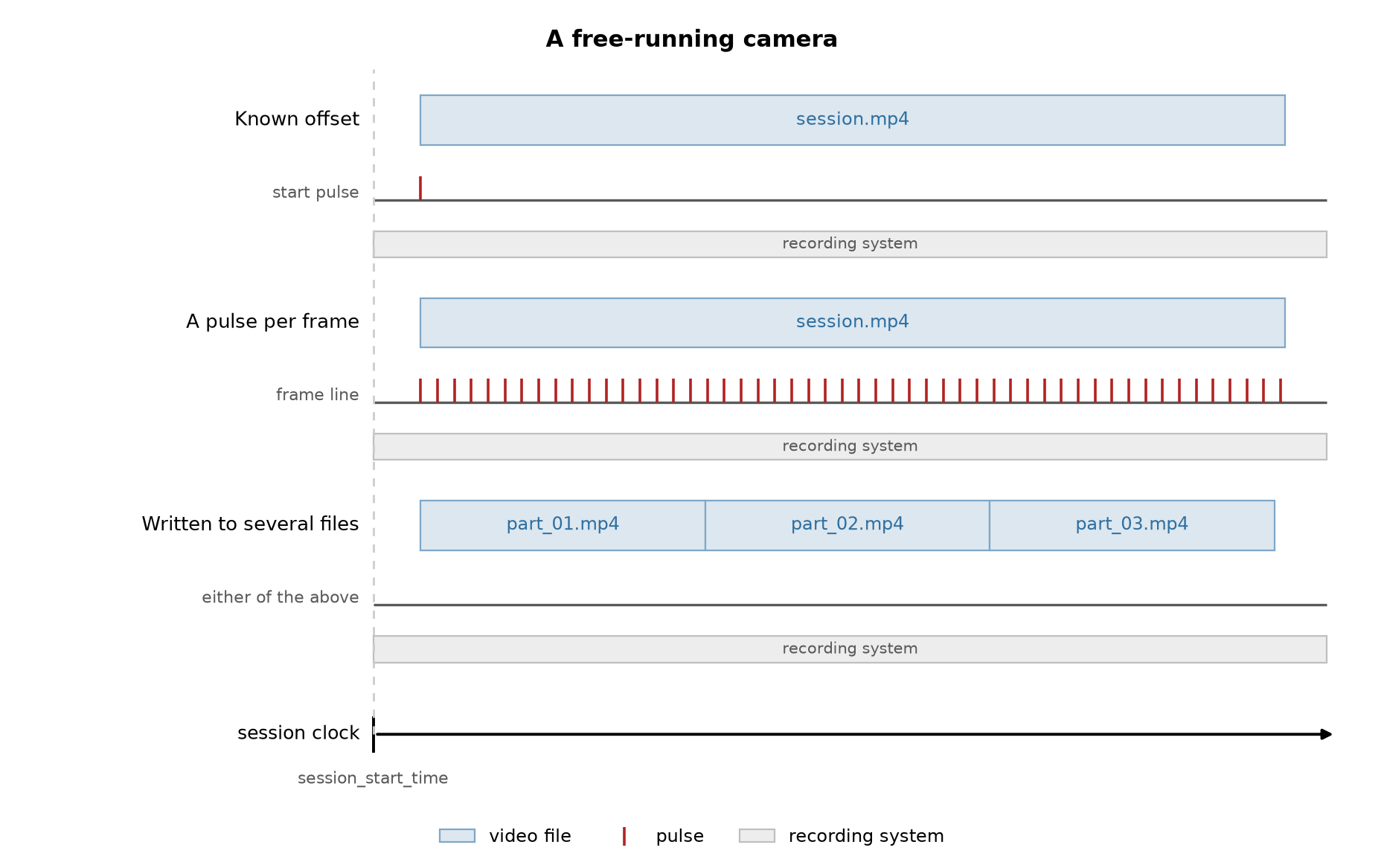
The video comes in one of two arrangements and each has its own section below. The figures all follow the same layout: the video files on top, the digital line that timed them below, and the recording system running underneath. The dashed line marks the session start, so the gap before the first file of a row is that row’s offset.
A free-running camera. It starts with the session and stops with it. The recording software may have written one file or several, depending on a file size limit or a timer. That does not change the timing. The frames are one continuous stream either way.
A triggered camera. A pulse starts it at each trial, so the session produces one file per trial with real gaps between them. This is the trialized case. Here the gaps are intended.
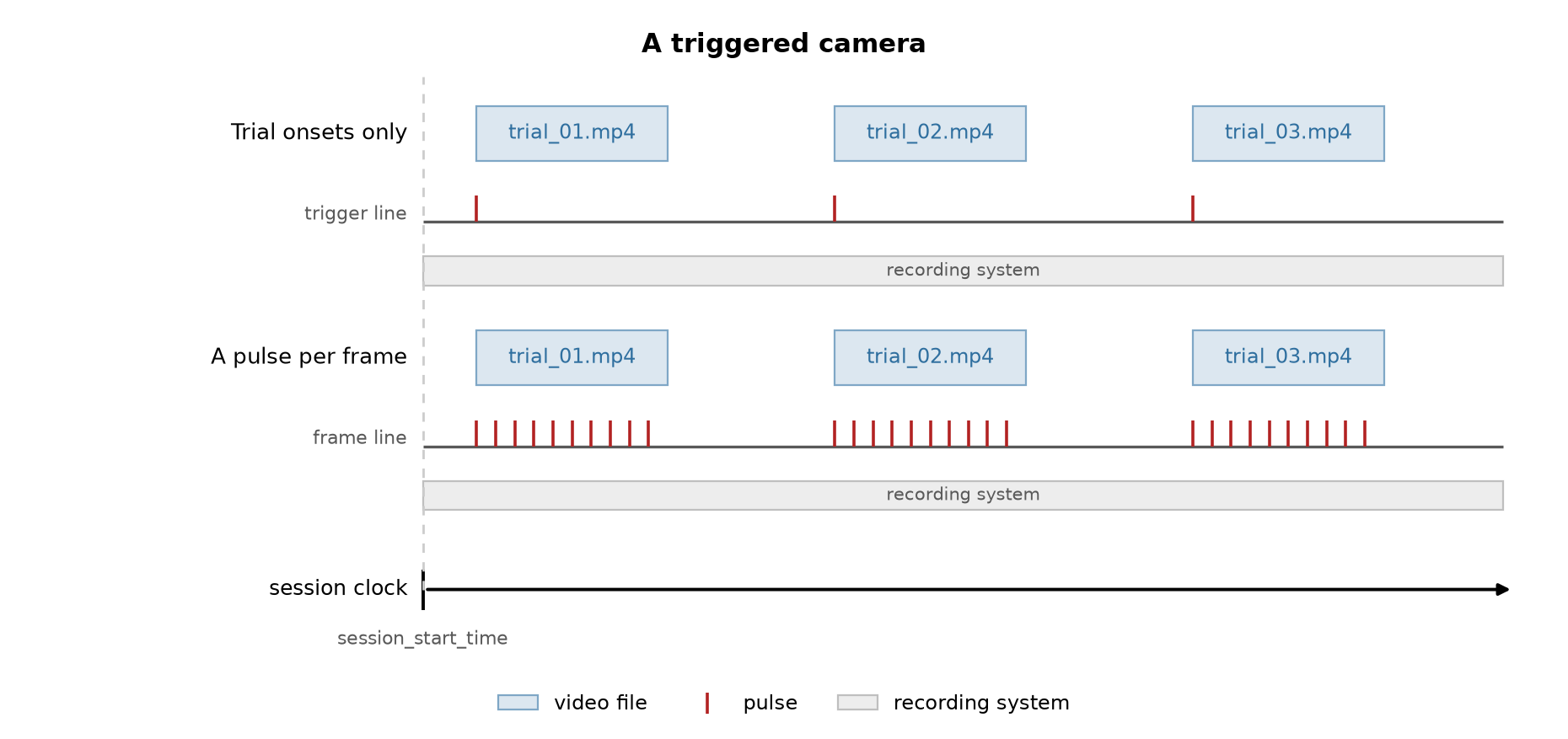
The two figures show the same three files, touching in one and separated in the other. The files on disk look identical in both cases. Only knowing what the rig did tells them apart.
Wiring between the camera and the recording system#
There is usually a cable between the camera and the recording system, and what runs along it decides how precise the alignment can be.
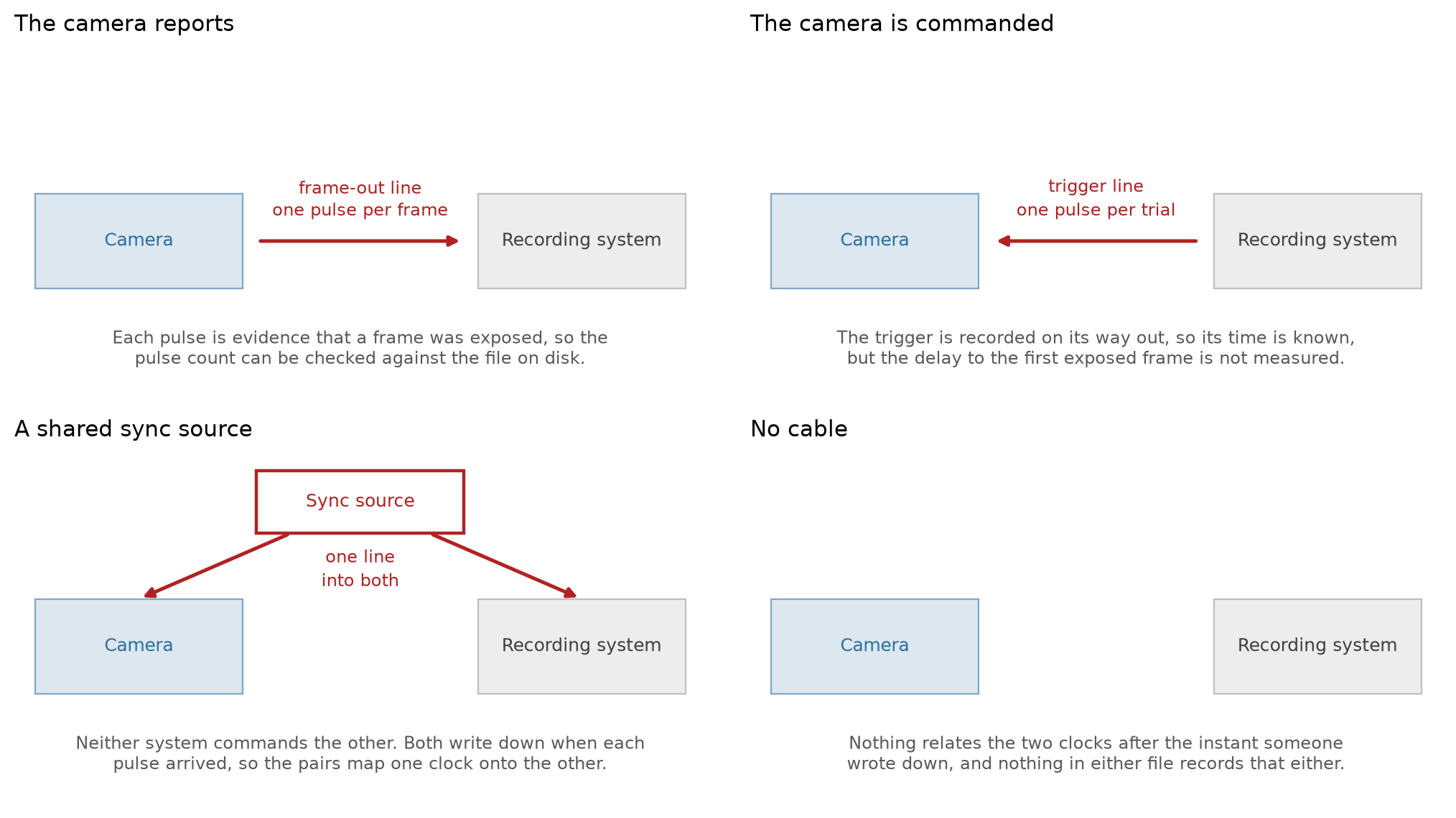
The camera reports. The camera has a frame-out or strobe pin that fires each time it exposes a frame, and the pin is wired into a digital input on the recording system. Every frame then has a time measured on the session clock. This is the best case. It corrects drift, and since each pulse means a frame was exposed, you can check the pulse count against the frame count in the file.
The camera is commanded. The line runs the other way, from the controller or the recording system into the camera’s trigger input. The same line is recorded on a digital input, so the time of the command is known. But the command is not a confirmation. The delay between the trigger and the first exposed frame is not measured and nothing in the file records it. Within a trial the frame times come from the nominal frame rate instead of a measurement.
A shared sync source. A third device, an Arduino or a Bonsai workflow, sends pulses into a general-purpose input on the camera and into a digital input on the recording system at the same time. Neither system commands the other. Both write down when each pulse arrived. The same instants then appear in the camera’s metadata and in the recording, and those pairs define the map between the two clocks. Pulses are often sent in coded groups, a “barcode”, so the pairs cannot be matched wrong even if one system missed a pulse.
No cable. Then all you have is what someone wrote down, usually a start time, and nothing that relates the two clocks after that.
Which recipe applies#
Each row is one of the two arrangements and has its own section below. Each column is one of the four cable cases. The cell names the recipe inside that section and links to it.
arrangement |
the camera reports |
the camera is commanded |
a shared sync source |
no cable |
|---|---|---|---|---|
free-running camera |
a known offset, from the one start pulse |
a known offset, from your notes |
||
triggered camera |
a pulse per frame, in bursts |
the camera keeps its own clock, file by file, then |
A free-running camera that was split into several files by the recorder is the first row after the files are placed back to back, which is its own recipe.
Reading the pulse times from the recording system#
Whichever way the line points, it ends on a digital input of the recording system and is read the same way. Configure the line and read the event times back without writing anything:
from neuroconv.datainterfaces import IntanDigitalInterface, IntanRecordingInterface

recording_interface = IntanRecordingInterface(file_path="session.rhd")
digital_interface = IntanDigitalInterface(
    file_path="session.rhd",
    detection_configuration={
        "DIGITAL-IN-02": [
            {
                "signal_conditioning": {"binarize": "midpoint"},
                "detection": "rising",
                "event_name": "camera_frame",
            }
        ]
    },
)

frame_pulse_times = digital_interface.get_event_times("camera_frame")
Each key of detection_configuration names one input of the recording system as the file names it, here
"DIGITAL-IN-02". Use the input the camera’s cable is plugged into on your rig. A name the file does not
hold throws an error that lists the ones it does.
The pulses are on the clock of the system that recorded them. Times read from an Intan digital line are on the Intan clock, so the frames you give them to land on that clock too. That is the session clock as long as the recording interface is not shifted, and that is the usual arrangement: one system is the master because everything else is wired into it, and every other stream is expressed in its clock. If you do shift the recording, shift it before you read the pulses, so they come back with the shift included.
What goes in detection_configuration is how a signal becomes a line and
how a line becomes events.
A free-running camera#
One camera, running for the whole session, writing one file or several that run back to back. The interface
writes one ImageSeries. The only question is what timed it.
from neuroconv.datainterfaces import ExternalVideoInterface

video_interface = ExternalVideoInterface(file_paths=["session.mp4"], video_name="BehaviorCamera")
video_interface.alignment.keys()
# ('session',)
Each video file is addressed for alignment by the stem of its path, so a single video has one key. A single
video also writes with no alignment call at all. That claims it started exactly at session_start_time,
so check it instead of accepting it.
If a session has more than one camera, give each interface its own metadata_key. The key addresses that
camera’s entry in metadata["Behavior"]["ExternalVideos"] and keeps the two ImageSeries and their
devices apart. It is also what a PoseEstimation container names to say which video its keypoints were
tracked from (see How to Annotate Pose Estimation Metadata).
A known offset (no cable, or one start pulse). All you know is when the camera started relative to the session start, from a note or from the one trigger pulse that started it.
video_interface.alignment.shift_times(12.5)
The frame times come from the video’s own frame rate, shifted by the offset. This corrects the start and nothing else. Two clocks drift apart, so on a long session the error at the end of the video grows and no single number can fix it.
When the recorder split the session into several files. Still one continuous recording, but the software opened a new file every few minutes, so it arrives as several. If the recorder dropped no frames between closing one file and opening the next, the files run back to back and each starts where the previous one ended. The frame counts and rates give you those starts. The interface does not assume this: several files record nothing about how they relate, so every file starts where its container puts its first frame, usually zero, until you place it, and writing files that overlap raises an error. Place each file where the previous one ends:
import numpy as np

video_interface = ExternalVideoInterface(file_paths=["part_01.mp4", "part_02.mp4", "part_03.mp4"])

frame_counts = np.array(video_interface.get_header_frame_counts())
durations = frame_counts / np.array(video_interface.get_header_frame_rates())
starting_times = np.concatenate([[0.0], np.cumsum(durations)[:-1]])

for segment_key, start in zip(video_interface.alignment.keys(), starting_times):
    video_interface.alignment[segment_key].move_start_to(start)
move_start_to moves one file so that its first frame sits at the time you give on the session clock. It reads
nothing inside the file. If the camera also started late, shift the interface as in the known-offset case
and the files keep their layout. Nothing in the files records a gap between them if there was one. If the
rig has a frame-out line, use it and take each file’s times from the pulses instead, as in the trialized
case below.
A pulse per frame (the camera reports). The camera sent a pulse for every frame it captured, so the recording system timestamped each frame directly. This is accurate and corrects drift. Prefer it whenever the pulses exist.
frame_pulse_times = digital_interface.get_event_times("camera_frame")

video_interface.alignment["session"].set_times(frame_pulse_times)
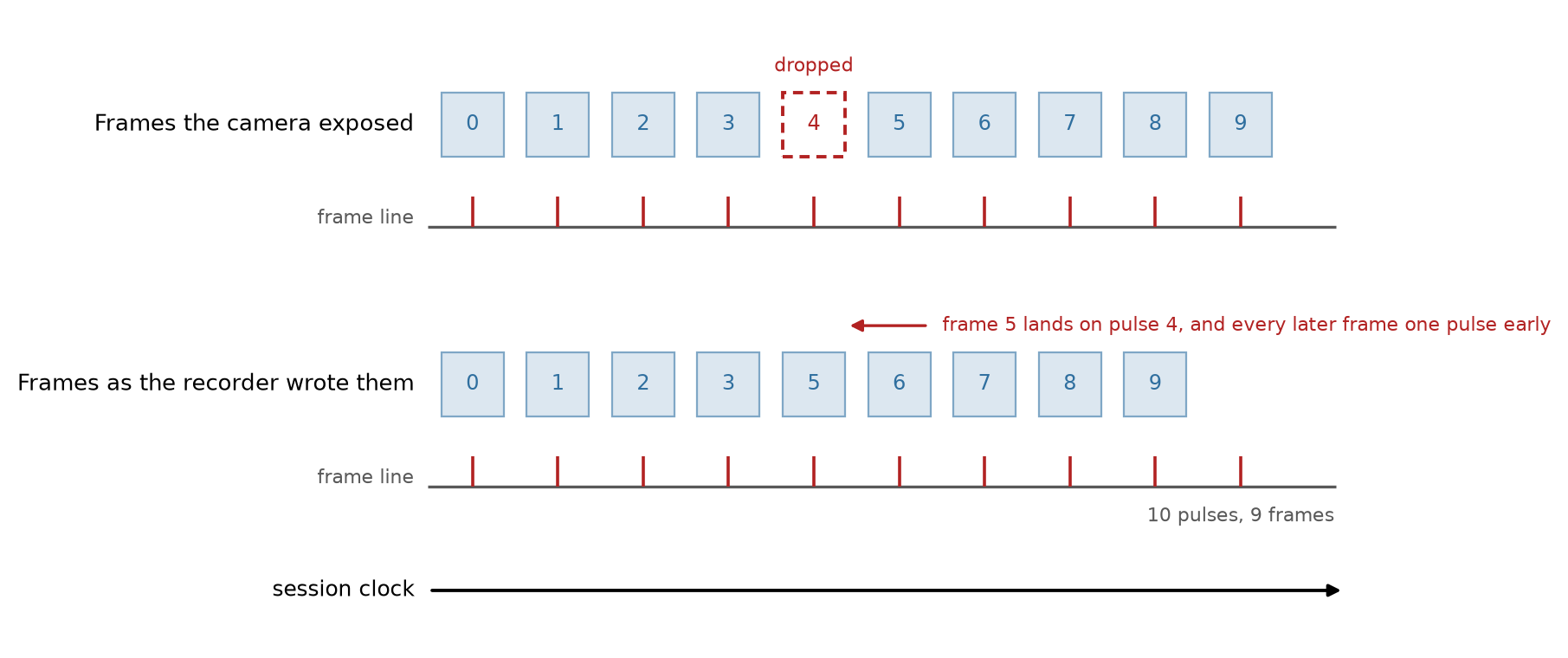
You do not have to count them first. The interface throws an error when the number of times does not match the number of frames and says by how much. Many more pulses than frames usually means the line was running before the camera started, so you want the tail of the pulses. A few pulses short means dropped frames. Do not trim the pulses to fit. Most recorders stamp each frame with its index instead of its time, so a dropped frame closes the gap instead of leaving one, and every later frame is written early. The pulses are the only record of where the missing frames were.
The camera keeps its own clock (a shared sync source). The camera writes a timestamp for every frame it captures, and a shared sync source sends pulses into both systems. The camera’s log then holds a time for every frame and a time for every sync pulse, all on the camera’s clock. The frame times are already one per frame but on the wrong clock. The sync pulses were written down by both systems, so they are what maps one clock onto the other. A shift will not do it because the two clocks drift.
# Read from whatever the camera's acquisition software wrote, both on the camera's own clock.
frame_times = ...  # one per frame
camera_sync_times = ...  # one per sync pulse

# The same pulses, as the recording system timestamped them, on the session clock.
recording_system_sync_times = digital_interface.get_event_times("camera_sync")

video_interface.alignment["session"].set_times(frame_times)
video_interface.alignment["session"].remap_times(
    local_sync_times=camera_sync_times,
    reference_sync_times=recording_system_sync_times,
)
Set the times from the log first. That puts the video on the camera’s clock. Then remap that clock onto the session clock. The two pulse arrays are paired by position, so they have to be the same length and in the same order, and a pulse that only one system recorded has to be dropped from both. Frames between two pulses are interpolated. No data is resampled, only the times move.
remap_times can also be called on alignment with no key, and then it re-times every file of the
interface at once. The drift belongs to the camera’s clock, not to one file, so that is the form for a
triggered camera on its own clock: place each of its files first, then one alignment.remap_times call
corrects all of them.
A triggered camera, one file per trial#
One camera again, but a pulse triggers it at the start of each trial, so the session produces one file per
trial with real gaps between them. Each file has to be placed on its own, with alignment[key].move_start_to.
A file left unplaced stays at its own start, usually zero, and the write raises an error when it overlaps the
file before it: in the
order given, each file has to begin after the previous one ends. The check is on the times, so a first file
left unplaced passes when every later file starts after it ends. Place the first file as well.
ExternalVideoInterface(file_paths=[...]) writes a single ImageSeries with one external_file
entry per input file. A session of forty trials is one container with forty entries. The container carries
the trial order in the external_file list and the frame numbering in starting_frame, over one
timestamps vector, so a reader gets the structure of the session from the object itself. Split into forty
containers, that structure would have to be reconstructed from their names. starting_frame marks where
each file begins within the series. It is computed from the frame counts and never appears in your code.
video_interface = ExternalVideoInterface(file_paths=["trial_01.mp4", "trial_02.mp4", "trial_03.mp4"])
video_interface.alignment.keys()
# ('trial_01', 'trial_02', 'trial_03')
If two trials wrote files with the same name in different folders, the stem alone no longer addresses either
one. The interface keys each such file by its stem prefixed with its parent folder names, closest first,
lengthening only as far as needed to tell the files apart: file_paths=["day_1/video.avi",
"day_2/video.avi"] gives alignment["day_1_video"] and alignment["day_2_video"]. A file whose stem is
already unique is unaffected. Only a collision that survives the files’ full paths, such as the same path
passed twice, raises at construction.
Trial onsets only (the camera is commanded). The digital line recorded the triggers and nothing else.
trial_onsets = digital_interface.get_event_times("camera_trigger")
segment_keys = video_interface.alignment.keys()
assert len(trial_onsets) == len(segment_keys)

for segment_key, onset in zip(segment_keys, trial_onsets):
    video_interface.alignment[segment_key].move_start_to(onset)
Each file is placed where its trigger fired. Within a file the frame times come from the nominal frame rate, so the drift caveat from the known-offset case applies again, per trial instead of once for the session. That is usually fine. A trial is short and a camera does not drift far in ten seconds.
move_start_to states where a file begins instead of how far to move it. Running the loop twice leaves the
files where it says instead of moving them twice. A shift_times on the interface afterwards moves every
file together.
Within a trial the frame times depend entirely on the rate the container declares, and a header can be wrong without the file saying so. An IBL Brain Wide Map camera declares exactly 150 fps while the hardware-measured rate is 150.4083. That is 11.5 seconds of error by the end of a session, on frames that are evenly spaced. Over a ten-second trial the error is a millisecond and does not matter. Over a long trial, or a session written as one file, use the pulses below instead.
A pulse per frame (the camera reports). This is the best case and the one to ask for when a rig is being designed. A frame-out line that is active only while the camera runs gives you both things at once. The pulses arrive in bursts, one burst per trial. The burst onsets are where the files start and the pulses within a burst are the frame times of that file.
import numpy as np

frame_pulse_times = digital_interface.get_event_times("camera_frame")

# The gap between trials is far larger than the frame interval, so the split is unambiguous.
frame_interval = np.median(np.diff(frame_pulse_times))
gap_indices = np.flatnonzero(np.diff(frame_pulse_times) > 10 * frame_interval) + 1
bursts = np.split(frame_pulse_times, gap_indices)

segment_keys = video_interface.alignment.keys()

assert len(bursts) == len(segment_keys), f"{len(bursts)} bursts for {len(segment_keys)} files."
for segment_key, burst in zip(segment_keys, bursts):
    video_interface.alignment[segment_key].set_times(burst)

# Each file starts on the first pulse of its burst, which the trials table below can use.
trial_onsets = np.array([burst[0] for burst in bursts])
Keep the assertion on the burst count. Without it zip stops at the shorter of the two lists and the
result looks fine. The interface checks the count within a file and throws an error when a burst does not
have one pulse per frame. In either case the pulse record and the files disagree about
the session, and you have to find the cause before the timestamps mean anything. The usual cause is a trial
that was triggered but never reached disk. That puts every later file onto the pulses of the wrong trial.
If your acquisition software logs which trials never reached disk, drop their bursts before pairing the rest with the files:
# Positions, in the full sequence of triggered trials, of the trials whose video is missing.
missing_trial_indices = {12, 47}
bursts = [burst for index, burst in enumerate(bursts) if index not in missing_trial_indices]
The count check then confirms each burst against its file. It cannot tell two trials of the same length apart, so on a rig where every trial runs for a fixed time the log is the only record of which burst is which.
A second line makes the split more robust. If the rig also has a line that marks when each trial began, bin the frame pulses between consecutive trial onsets instead of splitting on the gaps. This needs no threshold. A trial that recorded no frames comes back as an empty burst and the interface’s count check catches it, instead of it being silently merged into its neighbour.
trial_onsets = digital_interface.get_event_times("camera_trigger")
bursts = np.split(frame_pulse_times, np.searchsorted(frame_pulse_times, trial_onsets[1:]))
Recording which file is which trial#
A single ImageSeries with several external_file entries has no per-file timing metadata. The
structure is in the concatenated timestamps and in starting_frame, but no field says “file 2 covers
trial 2 and ran from here to here”, and a single file within the series cannot be addressed on its own.
That is a limitation of the schema, tracked in
nwb-schema#677. Write the mapping
somewhere that can hold it: a column on the trials table when the segments are your trials, or a
TimeIntervals of its own when a trial begins before the camera does or ends after it. See
Adding Trials to NWB Files for what else a trials table can carry.
frame_counts = np.array(video_interface.get_header_frame_counts())
durations = frame_counts / np.array(video_interface.get_header_frame_rates())

nwbfile.add_trial_column(name="video_file", description="The external_file entry holding this trial's frames.")
for onset, duration, file_path in zip(trial_onsets, durations, file_paths):
    nwbfile.add_trial(start_time=onset, stop_time=onset + duration, video_file=str(file_path))
Setups this guide does not cover#
Two setups we know of have no recipe.
One file per trial and no line. Nothing in the recording says where the trials sit. The starting times
have to come from somewhere else, a behavioral log or the modification times of the files, and you place
each file by hand with move_start_to.
A camera that free-runs while only some of its frames are written to disk. The counts no longer say which frames were saved, so neither the gaps nor the onsets can reconstruct the mapping. No alignment recipe repairs this. It needs per-frame metadata from the acquisition software.
The recipes here come from the rigs we have seen, and rigs vary more than a guide can cover. If yours does not fit any of them, or fits but produces something these calls cannot express, please open an issue describing what the camera did and what the recording system captured. That is the information this page is built from.